


XPlay Browser
4.062.00 Reviews
App Specs
- Version
- 2.22.0
- Updated On
- License
- Free
- Downloads
- 10,000,000+
- Developer
- Video Apps Mobile
- Categories
- Video Players & Editors
- Platform
- Android
Screenshots

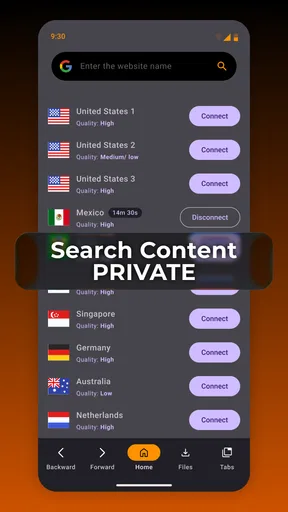
 Analysis by AppCompare
I usually judge a browser less by how many tools it advertises and more by whether it makes an everyday task easier without creating extra work. XPlay Browser is an app from Video Apps Mobile in the video-player and editor category, and its clearest appeal is the mix of browsing with supported video downloads. That makes it worth considering if you often find something to watch while browsing and want those activities in one place. I would still treat it as a focused alternative rather than an automatic replacement for the browser you already rely on.
What the free option means
The app is free to install, with in-app purchases priced from $0.99 to $5.99 per item. That gives you a straightforward way to try the basic experience before spending anything. I see that as a useful starting point, not proof that every capability is free: the purchase range is real, but the value of any paid item depends on what you personally need from the app. I would first use the free version for the specific browsing and video-saving tasks that brought me here, then decide whether a purchase solves a real annoyance.
XPlay Browser has a 4.0 average from around 21,000 ratings and has passed five million installs. Those figures suggest that it has attracted a sizable audience, but they cannot tell you whether its particular workflow will suit you. It is rated for Everyone, and version 2.22.0 requires Android 7.0 or later. The app was released on April 16, 2025, so anyone comparing it with a long-established browser should keep that newer release history in mind rather than assuming it has the same breadth of mature integrations.
Where the browser earns its place
I look at this section as a practical test of whether a video-focused browser belongs in a daily routine, rather than assuming one app should replace every browser already on your phone. The useful question is how often browsing naturally turns into saving a permitted clip, and whether keeping those steps together genuinely saves you effort. That distinction helps separate a handy second browser from an unnecessary switch.
A video-first browsing routine
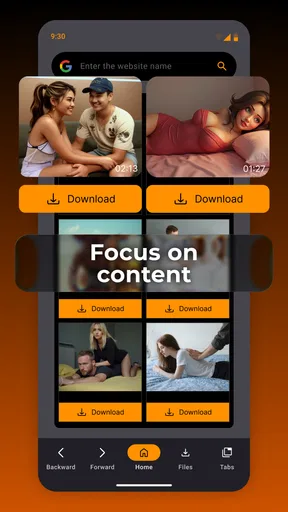
The most useful way to think about XPlay Browser is as a browser for people whose web use often leads to video. If I am looking up a recipe, a product demonstration, or a lesson, I may want to keep the page handy and save supported video for viewing later. Keeping discovery and that download workflow together can be more convenient than switching between a general browser and a separate video tool. The word “supported” matters: I would not assume every site or clip can be downloaded, and I would check the rules of the service and the rights attached to a video before saving or sharing it.
A realistic example is a commute planned around patchy connectivity. Before leaving, I could use the browser to find a permitted video that I expect to need, try the download option when it is available, and check that the saved file is accessible before relying on it away from a connection. That last check is easy to skip, but it is the difference between a useful offline plan and discovering too late that a clip was not actually saved in a usable form. I would keep important links as well, since a downloaded video and a bookmarked page serve different purposes.
What convenience is worth paying for
For me, the app's value comes from reducing steps, not from assuming that every extra is essential. A free browser can be enough if all I need is ordinary web access and occasional supported downloads. Paid items may make sense only if I understand what they unlock and expect to use it often; the listed price range alone does not establish which purchase is worthwhile. I would avoid buying on impulse, especially if my main goal is simply to test whether the browser handles the sites and media I visit.
Worth Reading Before You Choose

EA SPORTS FC Mobile 26 Is a Bigger Football Game, but It Takes Time

Flipboard Shows What News Apps Must Do Beyond the Feed

Switching to Android Auto Means Rethinking Your Driving Routine

Google Calendar Makes a Crowded Week Easier to Manage

Ludo King Makes the Most of the Minutes Between Plans

Baby Panda World Brings Quick Play to Modern Phones, but Its Game Library Feels Busy
There is also a practical trade-off in making one app responsible for both browsing and media-saving. Fewer app switches can make a short task feel smoother, but a dedicated browser may be a better fit for someone who depends on a broad extension library, tightly connected passwords and bookmarks, or a familiar setup across several devices. Likewise, a dedicated video app may offer a workflow better suited to someone managing a large personal media collection. XPlay Browser makes most sense when its combined purpose matches the way you already use the web.
Small habits that make downloads more useful
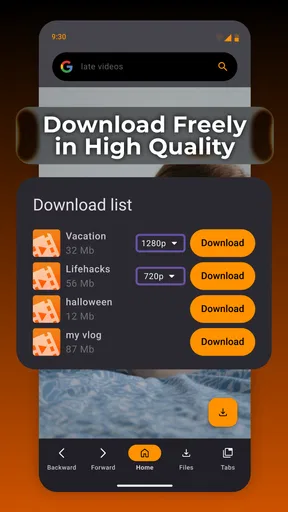
I would treat saving a video as a deliberate workflow rather than tapping download and moving on. First, confirm that the page offers a supported download; then consider whether the clip is the right quality and length for the situation, if those choices are presented. Afterward, check that the item is available where you expect to find it. These checks avoid a common frustration: assuming a video is ready for later when the process did not complete or the source was not eligible.
It also helps to separate temporary viewing from keeping something long term. A saved clip can be convenient for a trip or a lesson, while the original page may contain context, updates, captions, or other material that a local copy does not preserve. I would keep the source page when it matters, and I would not use a download feature to bypass a creator's or service's restrictions. That cautious approach makes the feature useful without treating every online video as free to copy.
Where it fits among familiar alternatives
Compared with a conventional mobile browser, XPlay Browser's distinction is its video-download focus rather than a promise that it will outperform every mainstream option. A general-purpose browser is usually the safer choice if your priorities are established syncing, extension support, or a consistent desktop-and-phone setup. If you mainly want to browse, search, and keep your existing account ecosystem intact, switching may add little. If supported video saving is a recurring task, having it alongside browsing may justify trying a second browser for that purpose.
Compared with a dedicated video downloader, a browser-centered app can be more convenient at the discovery stage because you are already viewing the page where a clip appears. The trade-off is that this convenience should not be confused with universal compatibility or a full media-management system. I would use XPlay Browser for occasional, legitimate saves tied to browsing, but look elsewhere if I need dependable support for a particular service, a large organized library, or advanced playback controls. Those are different needs, and the best tool depends on which one dominates.
Who is likely to get the most from it
I would recommend giving it a try if you often browse for tutorials, demonstrations, or other videos and want a single place to find them and save eligible ones for later. It can also suit someone who wants a free way to test a video-oriented browser before deciding whether any paid items are useful. The key question is not whether downloads sound appealing in theory; it is whether you have a repeatable use for them, such as preparing a few permitted clips before travel or keeping a lesson available during a study session.
I would skip it as a primary browser if I rely on extensions, deep customization, or a carefully established cross-device setup and do not want to rebuild that routine. I would also look elsewhere if the sites I use do not offer supported downloads, or if I need a media library with capabilities beyond saving occasional clips. In those cases, a standard browser for everyday navigation and a separate, authorized video solution may be a less frustrating combination.
Questions to settle during a first try
Before committing to a new browsing routine, I would test the exact things that matter to me: whether my regular pages open correctly, whether a video I am allowed to save presents a supported option, and whether I can locate the result afterward. I would also check how the app behaves when I return to a page after leaving it, rather than assuming a download-oriented browser will match every feature of my usual one. A short, practical trial is more revealing than judging by the download feature alone.
If you are wondering whether you need to pay, my answer is no—not to begin evaluating it. The app is free, while optional in-app purchases fall in the stated $0.99 to $5.99 range; I would only consider one after seeing a clear benefit for my own routine. If you are wondering whether it replaces a dedicated browser, I would say only when your needs are modest and its video workflow is especially useful. And if you are wondering whether every online video can be kept, do not count on that: support and permission both matter.
Getting Started with XPlay Browser
Downloading XPlay Browser was a breeze. It's available on both Android and iOS, so no one's left out. Once installed, the interface caught my eye right away. It's sleek, modern, and doesn't feel cluttered like some other browsers out there. Honestly, it was refreshing to see such a clean layout.
Features That Stand Out
What really sets XPlay Browser apart are its unique features. First off, there's the built-in ad-blocker. It's like having your personal bouncer that keeps those pesky ads at bay. Surfing the web without interruptions? Yes, please!
Then, there's the privacy mode. You can browse without leaving a trace, which is perfect for those moments when you're searching for birthday gifts or planning a surprise trip. And let's not forget the speed booster. Pages load faster than a kid running to an ice cream truck on a summer day.
User Experience
Now, onto the actual browsing experience. It's smooth. Really smooth. The pages load swiftly, and navigating through different tabs is a breeze. I particularly loved the option to customize the homepage. You get to choose your favorite sites and have them right there at your fingertips.
Oh, and did I mention the night mode? It's a lifesaver for late-night browsing. My eyes thanked me, and I bet yours will too.
A Few Observations
While XPlay Browser is packed with features, I did notice a couple of hiccups. Occasionally, the app would take a bit longer to start up. Also, if you're someone who uses a lot of extensions, you might find the selection a bit limited. But hey, nothing's perfect, right?
Overall, though, these are minor quibbles. The app's performance and features more than make up for it.
Final Thoughts
So, would I recommend XPlay Browser? Absolutely. It's a fantastic option for anyone looking to enhance their browsing experience. It's packed with features that cater to both casual and power users alike. Plus, it's free, so there's really no reason not to give it a try.
Go ahead, download it, and see how it fits into your digital life. Who knows? It might just become your go-to browser.
Pros
- Fast browsing with minimal lag.
- User-friendly interface for easy navigation.
- Supports multiple tabs efficiently.
- In-built ad blocker enhances speed.
- Customizable themes and settings.
Cons
- Limited extensions compared to competitors.
- Occasional crashes on older devices.
- No offline reading mode available.
- Sync issues with some accounts.
- Lacks advanced privacy features.
FAQs for XPlay Browser
What makes XPlay Browser different from other browsers?
XPlay Browser offers a unique combination of speed, privacy, and compatibility with various multimedia formats, making it stand out. It includes built-in ad-blocking, a customizable interface, and enhanced security features to protect your data. These elements are designed to provide a seamless browsing experience tailored for both casual browsing and high-performance needs.
How does XPlay Browser ensure user privacy and security?
XPlay Browser incorporates advanced security protocols, including end-to-end encryption and a robust tracking blocker. It also offers private browsing modes and regularly updates its security features to handle emerging threats. These measures ensure that your data remains private and secure while you surf the web.
Is XPlay Browser compatible with all multimedia formats?
Yes, XPlay Browser is designed to support a wide range of multimedia formats, including HTML5, Flash, and various video and audio codecs. This ensures that you can smoothly play videos, music, and interactive content without needing additional plugins, making it convenient for users who consume diverse media content.
Can I customize the XPlay Browser interface?
Absolutely, XPlay Browser offers extensive customization options. You can adjust themes, rearrange toolbars, and even add extensions to enhance functionality. The browser is designed to be flexible, allowing you to tailor the interface to suit your personal style and browsing habits, improving overall user experience.
Does XPlay Browser have a mobile version, and is it synchronized with the desktop version?
Yes, XPlay Browser is available on both Android and iOS platforms, and it offers synchronization features with its desktop version. This means bookmarks, history, and active tabs can be seamlessly synced across devices, providing a consistent experience whether you're on a smartphone, tablet, or computer.


